
Origins
This screen will show you list of endpoints configured for your domain.
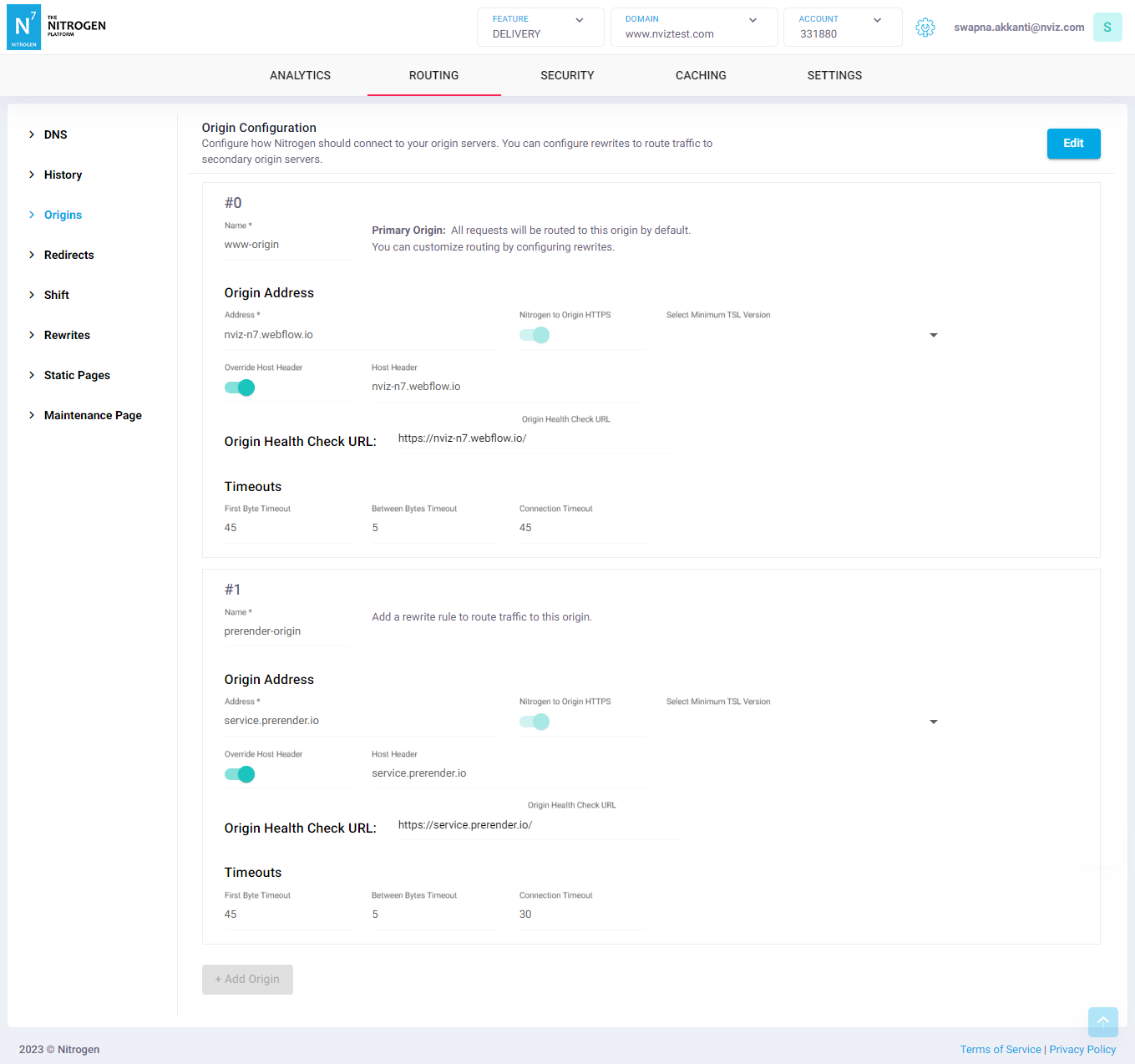
Typical use case with multiple origins is setting up proxies to different servers based on URL patterne.g. API / static-assets / admin / CMS / pre-render etc.
*Note: For demo purpose, we will be using www.nviztest.com domain as an example.
Prerequisite#
- You must have an account on Nitrogen
- You must have some domain registered on Nitrogen.
Steps#
Select the respective
AccountandDomainfrom the dropdowns at the top right corner.Then select
Originstab. You will be shown a screen with list of all the origins configured for that domain.Click on
Add Originbutton to configure multiple origins.Provide the respective details.
Name: A label for the origin being configured.Note: Please keep the origin name meaningful, as it will be referred in multiple places.Address: Endpoint address (LB URL/IP) where Nitrogen will be connecting to fetch the response.Host Header: Host header to be set while connecting to endpoint. It is optional. If not given domain-name will be used as host.Override Host Header: Host Header is optional. If not given domain-name will be used as host. Enable this if you wih to provide different host header value.Nitrogen to Origin HTTPS: Enable it if origin should be connected with secure connection.Primary Origin: Mark this origin as the one traffic is routed to by default, when no other routing rule matches.Note: A domain can have only one primary origin, and an origin cannot be deleted while it is marked primary.Origin Health Check URL: Provide a working non-cached URL that will be accessed for liveliness check.Note: If your domain is behind firewall, please get these Nitrogen IPs whitelisted there.Connection Timeout: Time for which Nitrogen will wait to connect to endpoint.First Byte Timeout: Time for which Nitrogen will wait to receive first response byte from endpoint after connection is formed.Between Bytes Timeout: Time for which Nitrogen will wait between the packets to receive remaining response content.
Notes#
- These changes will only take effect when deployed. Saving them will only be saving them in draft. Please refer documentation about Deploy process for it.
The origin marked as
Primary Originis used when no other routing rule matches. If no origin is marked, the first origin in the list is used instead. You can change this routing by configuring rewrites .You can create multiple origins where your domain proxies to.