
Nitrogen Headers
Refer this page to change the Nitrogen header names to the ones used in your code using. This feature is useful when you are migrating to Nitrogen from similar service, and are using these headers.*Note: For demo purpose, we will be using www.nviztest.com domain as an example.
Prerequisite#
- You must have a domain configured on Nitrogen
Steps#
Select your domain and
Deliveryfeature in your account. Click onRouting, then selectNitrogen Headerssection.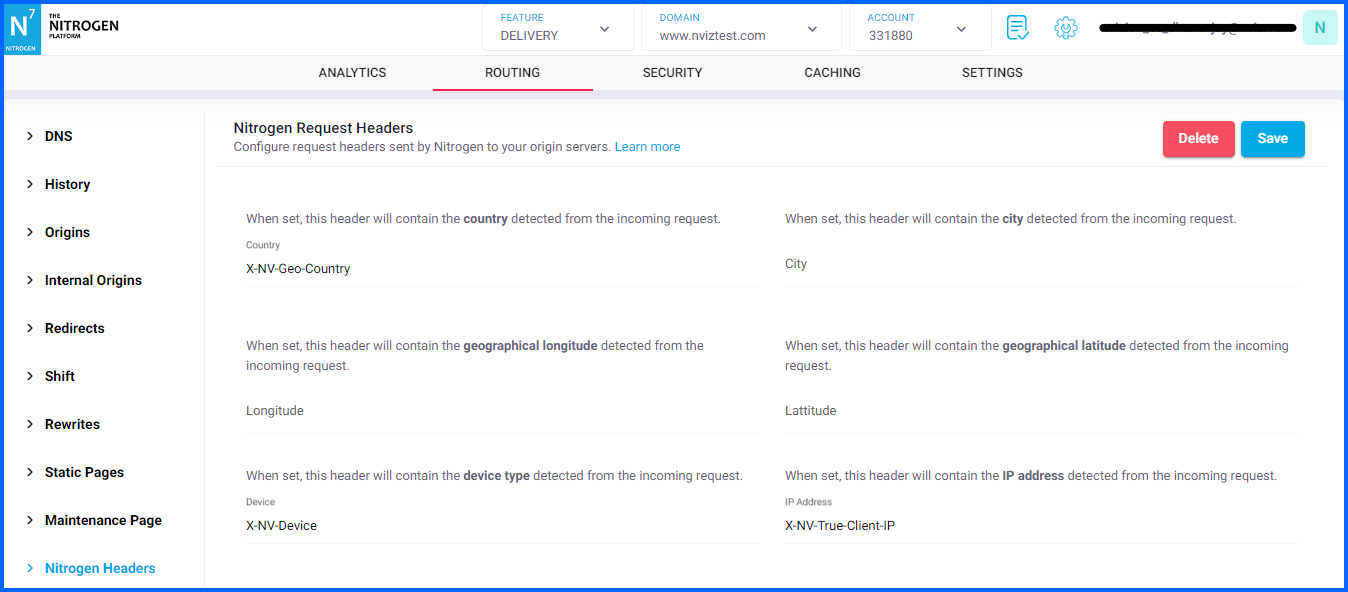
Set the respective request headers names.
Click on
Savebutton.
Notes#
These changes will only take effect when deployed. Saving them will only be saving them in draft. Please refer documentation about Deploy process for it.
Country, Device and User IP request headers are sent by default. For the remaining ones, please set the respective names and deploy.
The mobile-device header is one of these. Set a name for it, and Nitrogen will send
trueorfalseto your origin depending on whether the request came from a mobile device. This is useful if your origin serves different markup per device type.Refer this page to see the values that you will receive from these headers.